This application note describes how to program the Model 855B instruments with multiple output channels. Other BNC multi-channel Signal Generators (Model 825-M and the multi-channel Model 875) use the same SCPI 1999 command set; the programmer's manual of each model gives its channel syntax.
The basic multi-channel programming command syntax is introduced. An example shows how to configure multiple channels individually.
![Figure 3. Photo: the Model 855B four-channel Signal Generator in its standard 19 inch 1U casing, whose channels the [:SOURce#] and :OUTPut# nodes address.](figures/855b-ds/casing-standard-1u.png)
1Introduction
Devices with only one single channel provide one source and one output programming node. The [:SOURce]:… and :OUTPut:… ranges of command enable remote programming of reference configuration, source setup (frequency, power, modulations etc.) and output state (RF on/off).

Multi-channel devices provide multiple [:SOURce]:… and :OUTPut:… programming nodes, each dedicated to one of the channels. Some sub-nodes are common to all channels: frequency, power and modulations are set per channel, while the reference is common to all channels.
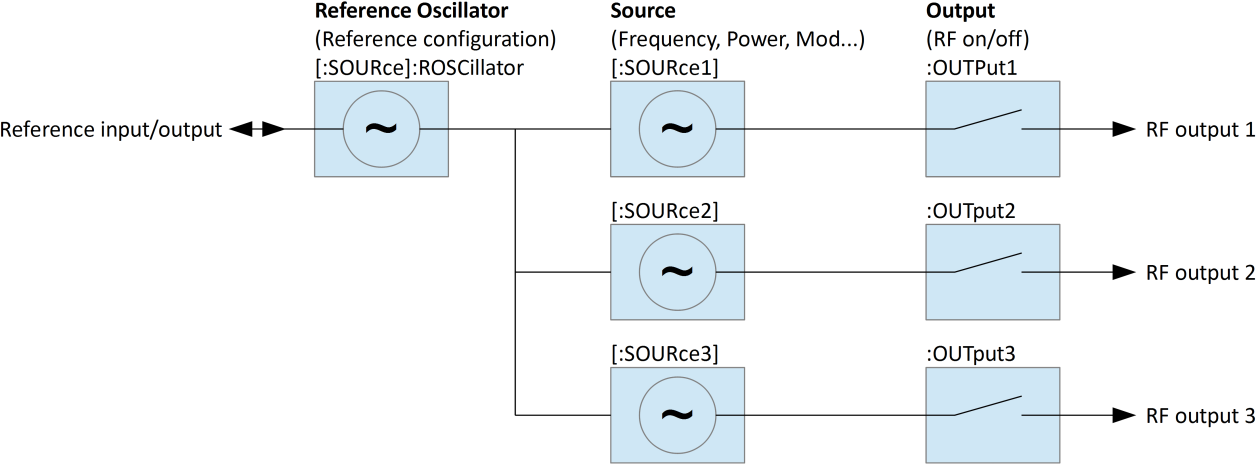
2Channel Selection
The channel can be selected in two different ways.
- Append a channel index to the [:SOURce] and :OUTPut nodes: [:SOURce#] and :OUTPut#, for example :SOURce1.
- Select the default source and output nodes. Commands within the [:SOURce] or :OUTPut nodes apply to the selected default source if no channel index is appended.
3Individual and Shared Settings
Some [:SOURce] and :OUTPut sub-nodes are common to all channels. Programming such sub-nodes will affect all channels at once. Channel index and default source selection won’t have any effect. This applies to the following sub-nodes:
| Sub-node | Description |
|---|---|
| [:SOURce]:ROSCillator | Reference configuration. Common for all sources. |
| [:SOURce]:SELect | Default source selection. |
4Quick Command Reference
This quick command reference covers basic multi-channel functionality: reference configuration, channel selection, per-channel frequency, power and output state settings. Refer to the Signal Generator programmer’s manual (Software & Drivers) for a complete command reference.
[:SOURce]:SEL?
[:SOURce]:SEL? MINimum
[:SOURce]:SEL? MAXimum
[:SOURce]:SEL <x>
Gets or sets default source and output channel selection. Range 1…number of channels. The MAXimum query returns the number of sources available. Reset (*RST) default: 1.
[:SOURce#]:FREQuency?
[:SOURce#]:FREQuency <x>
Gets or sets source frequency. Applies to currently selected default source if [:SOURce#] node or source index # is omitted. Applies to source # (range 1…number of channels) otherwise.
[:SOURce#]:POWer?
[:SOURce#]:POWer <x>
Gets or sets source power. Applies to currently selected default source if [:SOURce#] node or source index # is omitted. Applies to source # (range 1…number of channels) otherwise.
[:SOURce]:ROSCillator:SOURce?
[:SOURce]:ROSCillator:SOURce INTernal|EXTernal
Gets or sets reference source. Applies to all channels. Reset (*RST) default: INTernal.
[:SOURce]:ROSCillator:OUTPut[:STATe]?
[:SOURce]:ROSCillator:OUTPut[:STATe] 0|1|OFF|ON
Gets or sets reference output state. Reset (*RST) default: 0|OFF.
:OUTPut#[:STATe]?
:OUTPut#[:STATe] 0|1|OFF|ON
Gets or sets output state. Applies to currently selected default output if the output index # is omitted. Applies to output # (range 1…number of sources) otherwise. Reset (*RST) default: 0|OFF.
5Programming Examples
Programming of the following setup:
- Reference source external, reference output enabled
- Source 1: 0 dBm, 1 GHz, output enabled
- Source 2: 5 dBm, 2 GHz, output enabled
- Source 3: 6 dBm, 2.1 GHz, output enabled
Method A: Specifying source and output indices
ROSC:SOUR EXT
ROSC:OUTP ON
SOUR1:POW 0 DBM
SOUR1:FREQ 1 GHZ
OUTP1 ON
SOUR2:POW 5 DBM
SOUR2:FREQ 2 GHZ
OUTP2 ON
SOUR3:POW 6 DBM
SOUR3:FREQ 2.1 GHZ
OUTP3 ON
Method B: Changing the default source selection
SOUR:SEL 1
POW 0 DBM
FREQ 1 GHZ
OUTP ON
SOUR:SEL 2
POW 5 DBM
FREQ 2 GHZ
OUTP ON
SOUR:SEL 3
POW 6 DBM
FREQ 2.1 GHZ
OUTP ON