Using the ATE Demo Excel Macro
This application note provides instructions to set up and use the ATE demo that can be downloaded as a zip archive from our homepage. The demo drives phase-noise measurements on the BNC 7000 Series from within Microsoft Excel using the AP Comm COM library.
Requirements
The following components must be installed as described:
- VISA shared components: Install the PNT GUI and check the option to install USB drivers. This automatically installs the required VISA drivers.
- AP Comm COM lib: The BNC communication COM-library is necessary to access the drivers from within VBA. Unzip the archive that was downloaded. In the folder AP Comm COM lib run the file
register_AP_COMM_COM.batadministrative rights (right click, then select Run as administrator). The batch file will automatically register the library, which is located in the same folder. Refer to Figure 1 below. - Microsoft Excel: Installed on the computer.
Using the Macro
- Open the workbook. Double click ATE demo.xls. If macros are not enabled by default, a message will notify you that the Macro in this file has been disabled. Enable it again. Note: You can also configure Excel to always accept macros.
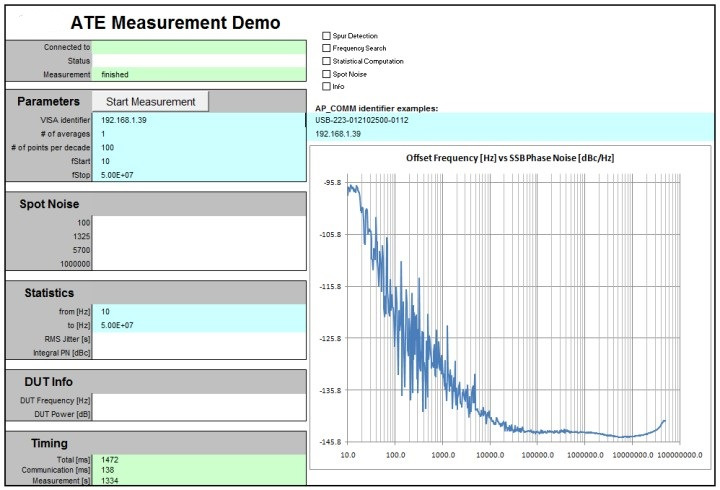
- Review the interface. After startup, the basic user interface is displayed. The blue background cells are user inputs.
- Set the VISA identifier.
- If the PNT is connected over Ethernet, the VISA identifier is the IP.
- For USB connections, the VISA identifier will be 'USB-<serial>' as shown in the first example on the right.
- Start the measurement. To start the measurement, click the measurement button.
Note. To optimize for speed, some of the measurement stages can be turned off. Keep in mind that the frequency search has to be activated for the first measurement of a newly connected DUT.
Talk to an application engineer
If you want help automating phase-noise testing on your 7000 Series analyzer, our engineers can walk you through the ATE demo setup and adapt it to your test bench. Request a quote through our quote request page, or reach us at info@berkeleynucleonics.com or 800-234-7858. We will make sure your automated measurements start clean on the first run.
Ask now → Chat with our assistant and get an answer in seconds.